
In mid-August 2026, Google began rolling out a change to how target-based bidding behaves when a campaign is limited by budget. The rollout started on August 17 and was scheduled to finish by August 27, so the new behavior is now fully in place.
If you manage campaigns on Target CPA or Target ROAS, this is worth a careful look. The change is not dramatic on paper, but it exposes a problem many accounts have carried for years: targets that were set once and never revisited.
What actually changed
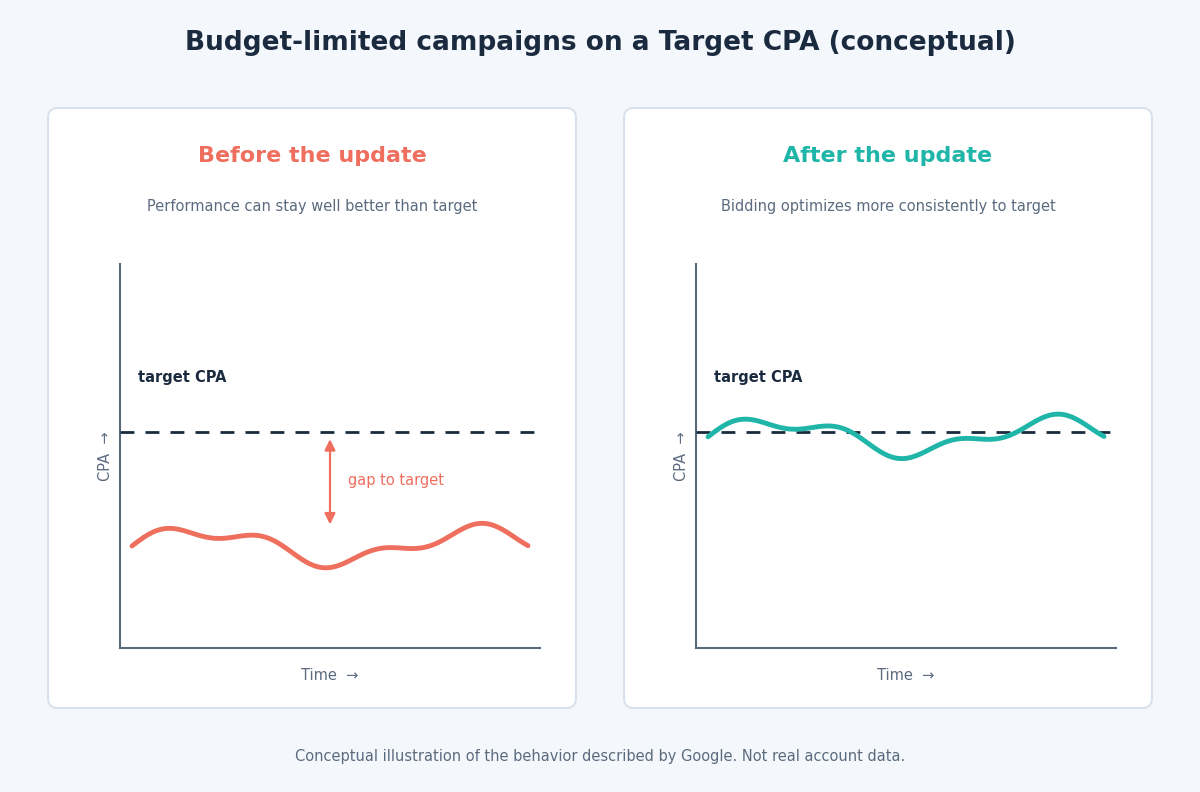
Previously, a campaign limited by budget could keep beating its target, delivering a lower CPA or a higher ROAS than you asked for while leaving conversions on the table. Now, according to Google’s documentation, these campaigns optimize more consistently to the target you set.
Some details matter for scoping:
- It applies to Target CPA and Target ROAS across Search, Shopping, Performance Max, Demand Gen and Travel campaigns, and to Target CPC in Demand Gen.
- It only affects campaigns showing a “Limited by budget” status.
- It does not affect unconstrained campaigns, manual CPC, or Target Impression Share.
- Google does not adjust your budgets or targets for you, and your daily and monthly budget limits are still respected.
In practice, a campaign that was quietly outperforming a cautious target on a small budget may now behave differently, and a target that no longer reflects your business can start to hurt. Google’s own guidance is that campaigns may underperform if they are running on outdated targets.
Step 1: Rebuild targets from your economics
Start from what a conversion is worth to your business, not from what the account has delivered historically.
For ecommerce, break-even ROAS is the inverse of your gross margin. At a 40% margin, break-even is 2.5, or 250%. Your target should sit above that by whatever profit buffer you need. For lead generation, work backwards from the value of a customer: multiply your lead-to-customer rate by your average customer value, and that is roughly the most you can pay per lead before you lose money.
A target should be a business limit, not an aspiration. If it is set tighter than your economics require, you are choosing lower volume for no reason.
Step 2: Resolve the budget and target conflict
A target and a budget are two levers on the same outcome. If a campaign is limited by budget and you have a demanding target, you are constraining it twice.
Decide which lever matters for that campaign. If it is profitable and you want more volume, give it budget headroom, which Google itself recommends to avoid the limited status. If budget is fixed, relax the target so the system has room to spend efficiently. Google also provides a Target Adjustment Tool that suggests updated targets based on recent performance, which is a sensible starting point for review.
Step 3: Give changes time to work
Bidding strategies need time to adapt. Google recommends allowing one to two conversion cycles after changing a target before judging the result. If your typical customer takes three weeks to convert, a five-day verdict tells you almost nothing.
Just as important, resist reacting to the change by piling on constraints. Google’s guidance is to avoid applying data exclusions or bid limits solely in response to this update, since they can restrict the system more than the problem warrants.
Step 4: Match the strategy to your data
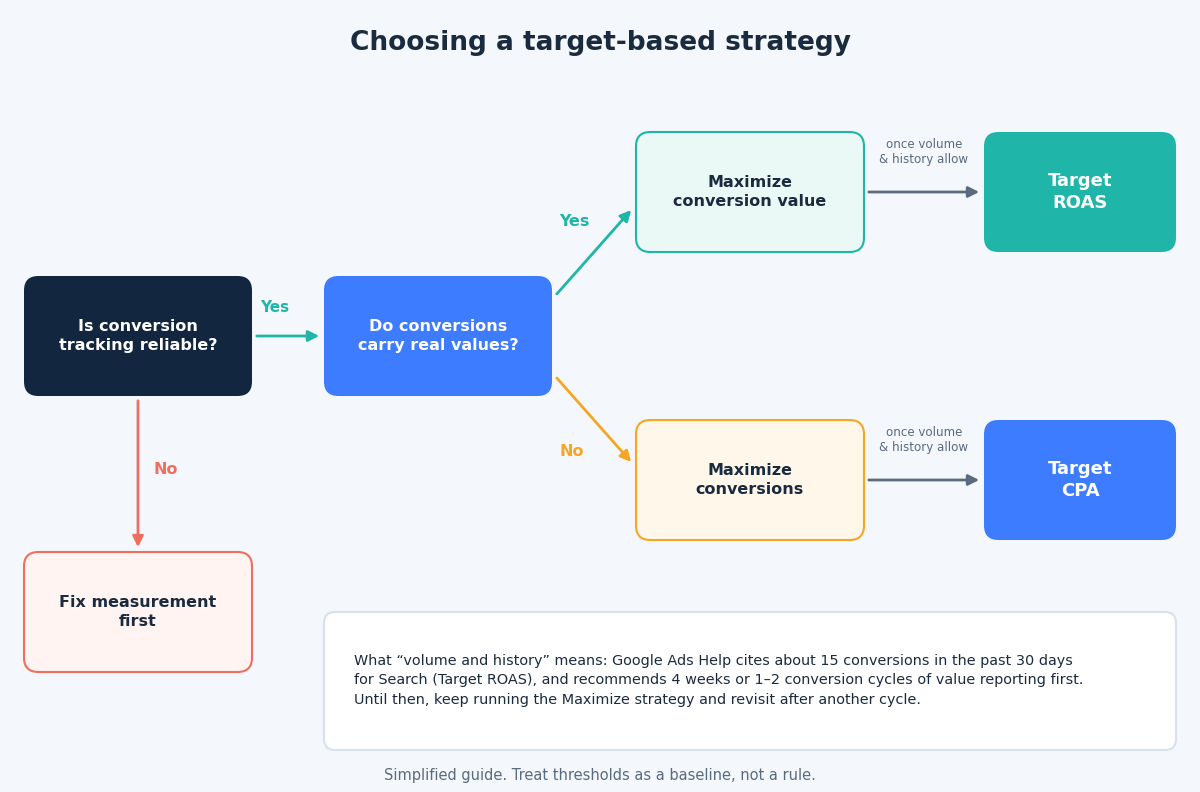
Target-based strategies need enough conversion history to work. For Search and Shopping, Google’s Target ROAS documentation cites 15 conversions in the past 30 days as a baseline for Target ROAS, and it recommends four weeks or one to two conversion cycles, whichever is longer, of conversion value reporting before you start.
A sensible progression for a newer or lower-volume campaign is:
- Maximize conversions or Maximize conversion value with no target, to build history.
- Add a target once you have stable volume and a reliable baseline.
- Tighten gradually. To gain volume, lower the target in modest steps. To gain value, raise it.
Step 5: Monitor what matters, less often
The new behavior makes it tempting to check performance daily, but frequent changes reset learning and blur cause and effect. A calmer routine works better:
- Weekly: check the “Limited by budget” status, impression share lost to budget, and actual CPA or ROAS against target.
- Every two to four weeks: review whether targets still match margins, seasonality and business goals.
- After any change: note the date, and wait through a conversion cycle before the next one.
Multi-channel campaigns such as Performance Max deserve extra attention. Google notes that spend can shift across channels under the new behavior, so review channel-level performance rather than only the headline numbers.
The takeaway
The August update rewards advertisers who treat targets as living business decisions. Rebuild them from your economics, remove the tension between budget and target, give changes time, and let the system work. If you want help reviewing your targets, get in touch through the contact page and we will go through your campaigns together.
Related reading
- Google Ads budget control: daily limits, pacing and shared budgets.
- Data-driven attribution and conversion lag: why recent days look weak and when to judge results.
- The Google Ads audit: nine expensive mistakes you can find in an hour.