Almost every Google Ads account we review leaks money in the same places. The leaks are rarely dramatic. They are small, quiet configuration problems that compound month after month because nobody looks at them once campaigns are live.
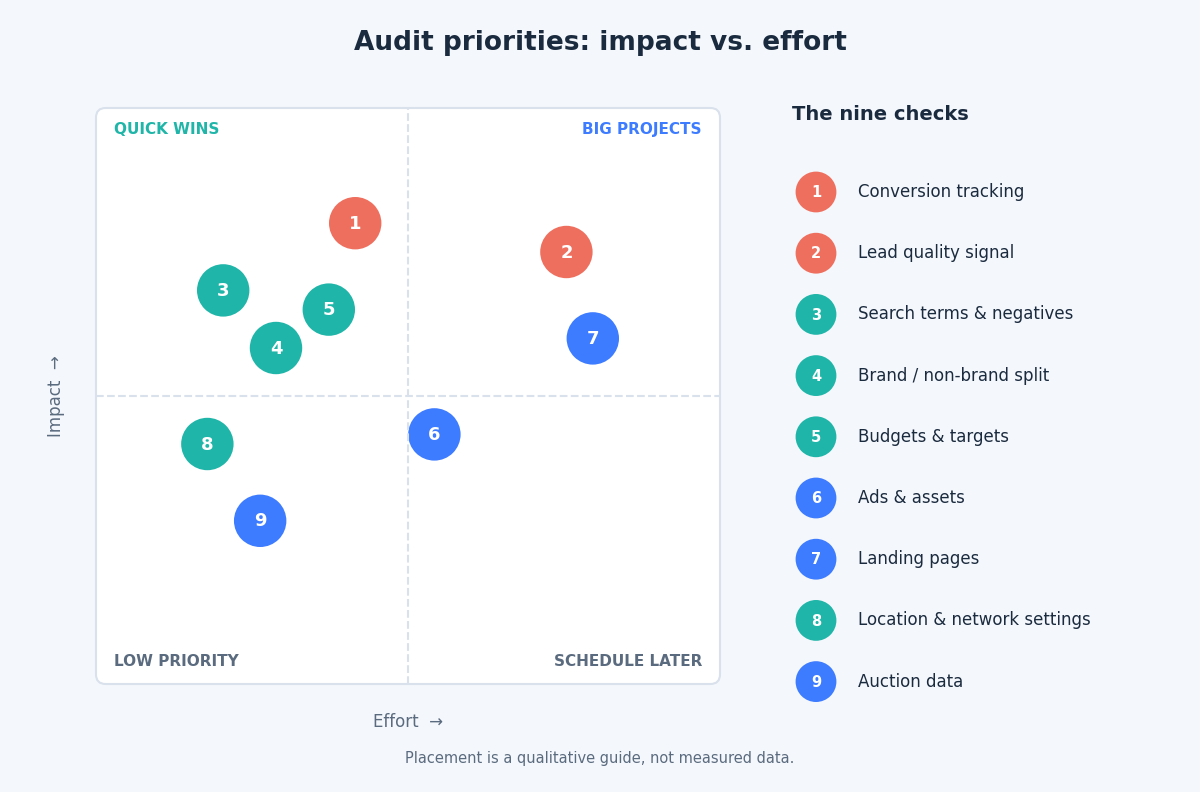
The good news is that you do not need a 100-point checklist to find most of the waste. An hour spent on the nine areas below, in this order, will surface the majority of expensive issues.
1. Conversion tracking counts the wrong things
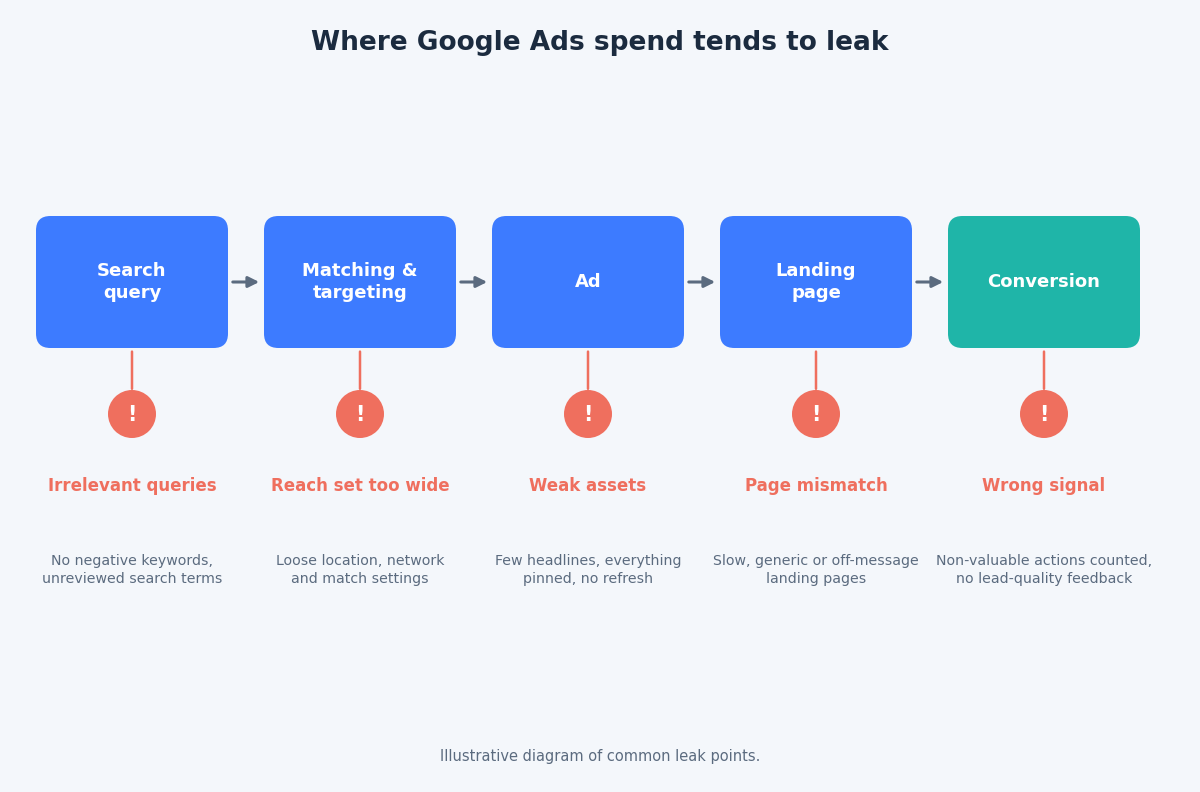
Start here, because every other optimization depends on it. Common problems include page views or button clicks set as primary conversions, the same purchase counted twice by two tags, and every micro-action given equal weight to a signed contract.
If Smart Bidding is optimizing toward the wrong action, it will get very good at delivering the wrong result. Open your conversion settings and ask of each primary action: would I pay for this outcome?
2. No signal about lead quality
For lead generation accounts, a form fill is not a customer. When every lead looks identical to the algorithm, it optimizes for the cheapest lead, which is often the lowest-quality one.
Enhanced conversions for leads and offline conversion imports let you send qualified or closed-won outcomes back to Google, so bidding can learn which leads actually matter. If your CRM knows which leads became customers and Google Ads does not, that is your first fix.
3. The search terms report goes unread
Broad match and automated query expansion can find valuable new searches, but they also find irrelevant ones. The search terms report is where you catch the difference.
Review it on a regular schedule, add irrelevant queries as negative keywords, and maintain shared negative keyword lists for themes such as jobs, free, DIY and competitors you do not want to bid on. Account-level negatives are useful for terms that should never trigger any campaign.
4. Brand and non-brand traffic are blended together
Brand searches usually convert at a much lower cost than generic ones. When both sit in the same campaign, blended CPA and ROAS look healthier than the non-brand reality, and you can end up crediting paid search for demand you already owned.
Separate brand into its own campaign, and if you run Performance Max, consider brand exclusions so it does not quietly absorb branded queries.
5. Budget and targets are fighting each other
Check which campaigns show a “Limited by budget” status. A campaign that is limited by budget while sitting on a strong return is a candidate for more spend. A weak campaign with a generous budget is a candidate for less.
Also compare your bidding targets against your real economics. A target CPA set on habit, rather than on margin and lifetime value, will either strangle volume or waste money.
6. Ads are treated as finished
Responsive search ads work by combining assets, so every headline and description must make sense in any combination. Look for ads with a handful of headlines, headlines pinned into every position, or near-duplicate assets that give the system nothing new to test.
Ad Strength is a helpful diagnostic, but it is not a business metric. Judge assets by conversions and cost per conversion, and refresh the poor performers.
7. The landing page does not match the promise
A strong ad sending traffic to a slow, generic or mismatched page wastes the click you paid for. Check page speed on mobile, message match between ad and page, and whether the conversion action is obvious within seconds.
If you use features that expand final URLs automatically, review which pages are actually receiving traffic and exclude any that should not.
8. Default settings quietly widen your reach
Some campaign settings are easy to forget. Review these three:
- Location options. Targeting people with presence or interest in a location can serve ads to people who are merely searching about the area.
- Network settings. Confirm whether Search partners and Display expansion are switched on for Search campaigns and whether they are earning their spend.
- Language and device settings. Make sure they match how your customers actually search and buy.
9. Auction data goes unused
Impression share metrics tell you why you are missing traffic. Impression share lost to budget points to funding. Impression share lost to rank points to bids, ad relevance or landing page experience. Auction insights show who you are competing with and whether new players have entered.
Ignoring these is like driving with the dashboard covered.
Make it a habit, not an event
The most effective accounts are not the ones audited most thoroughly once a year. They are the ones checked lightly and consistently. A practical rhythm is a fifteen-minute review of search terms, budgets and conversions each week, a deeper monthly check of assets and landing pages, and a full audit each quarter.
If you would like a second pair of eyes on your account, get in touch through the contact page and we can review these nine areas together.
Related reading
- Google Ads account structure in 2026: fewer campaigns, stronger signals.
- Smart Bidding targets after the August update: how to set targets that hold.
- Enhanced conversions for web: setup methods and diagnostics for hashed first-party data.