A common pattern in Google Ads reporting: yesterday and the day before show almost nothing, so bids and budgets get changed. A few days later the same period looks fine. Nothing was wrong except the timing of the report.
Two mechanics explain most of this: how Google Ads shares credit for a conversion, and when it reports that conversion. Once you understand both, you know when a result is safe to judge and when to wait.
What data-driven attribution does
Attribution decides which ad interaction gets credit for a conversion. Under last click, the final ad the customer clicked gets all of it. Under data-driven attribution, Google uses a counterfactual approach that compares the paths of customers who convert with the paths of customers who do not, and gives more credit to the interactions that appear to matter. The model is specific to your account and looks at interactions across Search, Shopping, YouTube, Display and Demand Gen.
A few points worth knowing:
- It is the default for most conversion actions. Last click and data-driven are the two models Google Ads supports. First click, linear, time decay and position-based were retired in 2023, and conversion actions that used them moved to data-driven attribution.
- Credit can be fractional. Google’s help page on understanding your conversion data says attribution models split credit across clicks, shown as decimals such as 0.33 or 0.50. Seeing 12.4 conversions is normal, not an error.
- It changes who gets credit, not how many sales you made. Your actual sales stay the same. What changes is which campaigns and keywords appear to have produced them, and what Smart Bidding learns from.
- More volume helps the model. The model works on your own data, so accounts with very few conversions give it less to learn from.
How conversion windows work
A conversion window is the period after an ad interaction during which a conversion is recorded. Google’s page on conversion windows lists the defaults: 30 days for click-through conversions, 3 days for engaged-view conversions and 1 day for view-through conversions. You can set windows between 1 and 90 days depending on the conversion source, and Google recommends at least 7 days because they give a richer set of conversion data.
Two consequences matter in practice. First, a change to the window applies to future conversions, so it will not rewrite history. Second, the window should match your real buying cycle. A quick impulse purchase and a considered B2B enquiry should not use the same assumption. The time lag report shows how long your customers actually take to convert, which is the right basis for the decision.
Why the last few days look weak
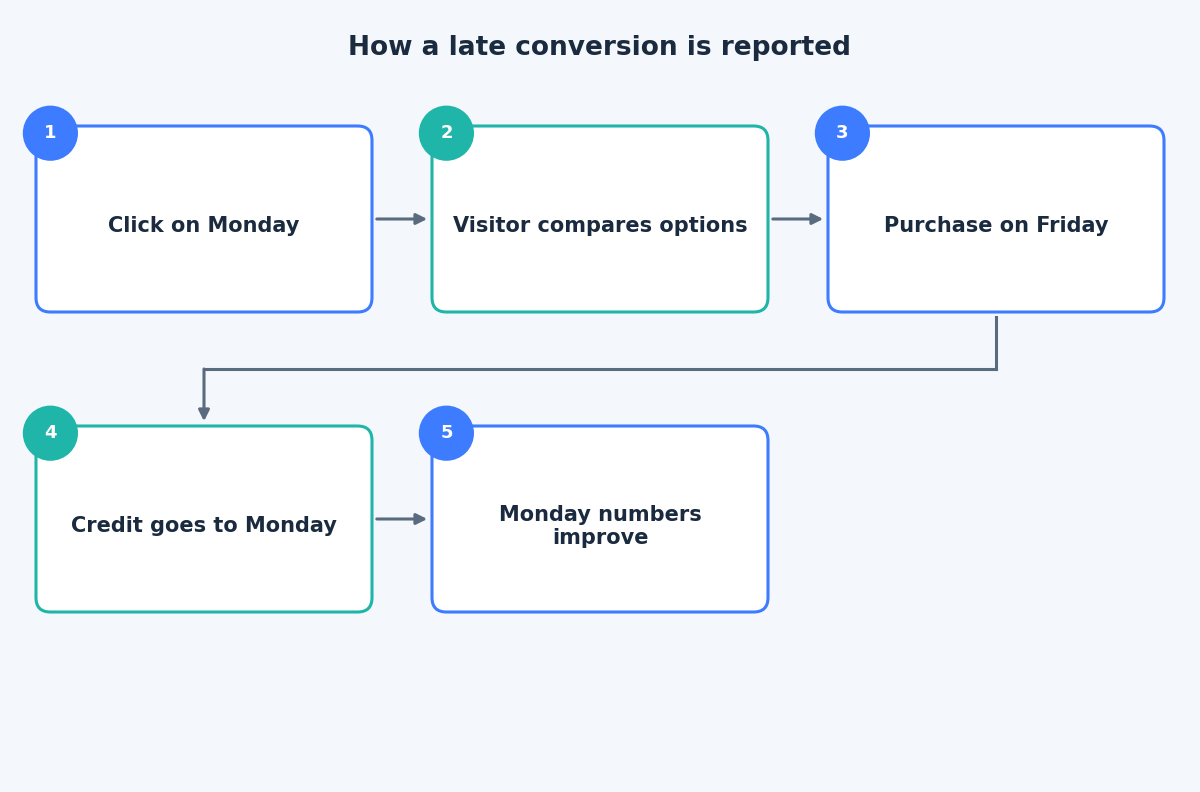
Google Ads reports conversions against the day of the ad interaction, not the day the conversion happened. A visitor who clicks on Monday and buys on Friday is credited to Monday, so Monday’s numbers keep improving for days while the newest days have had no time to catch up.
Google’s time lag report page notes that conversions can be reported up to 90 days after the click, depending on the window you chose. The practical effect is that recent CPA looks inflated and recent ROAS looks deflated, because those days have not yet collected their late conversions.
If you compare Google Ads with another tool, add the columns marked “by conv. time”. Google’s help page on data discrepancies recommends them because other tools usually assign the conversion to the day it happened, which reduces apparent differences.
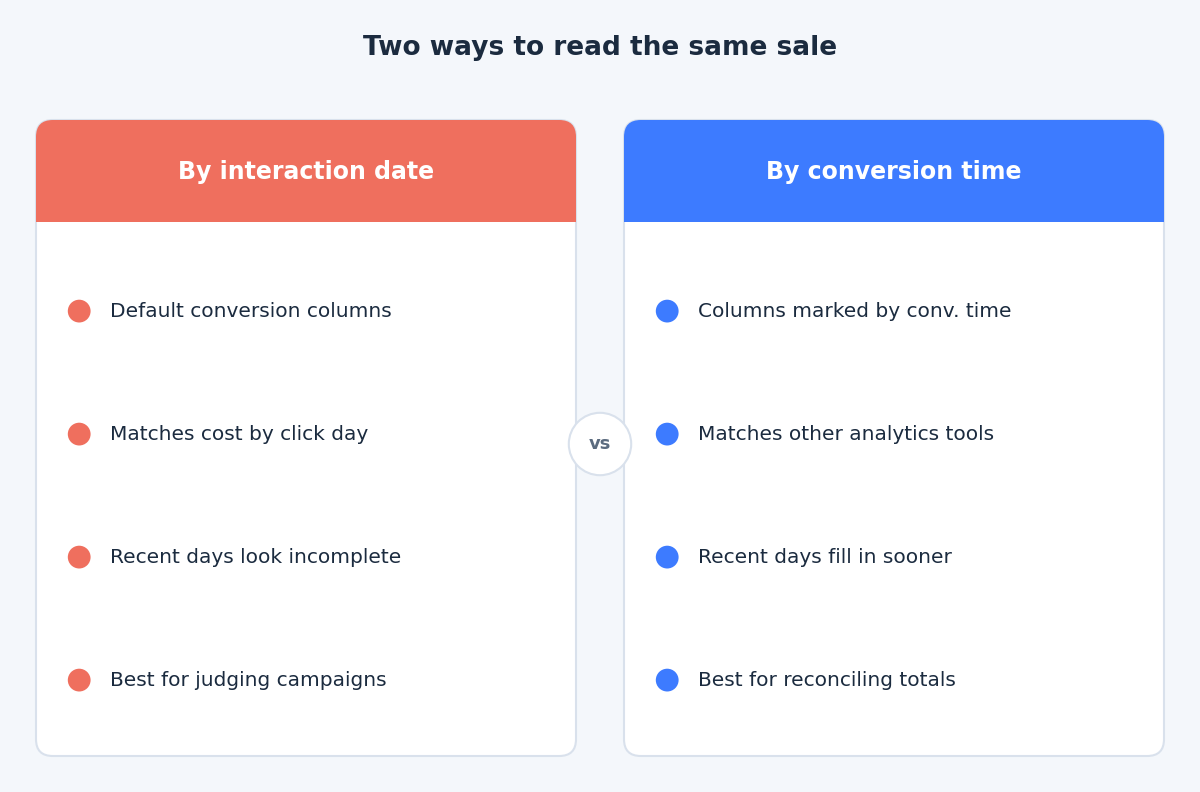
While conversions lag, other numbers do not. Impressions, clicks, click-through rate and cost are recorded as they happen, so they are the right things to watch in the most recent days. If spend and traffic look normal but conversions are thin, the likely explanation is that the buyers have not come back yet. Pausing campaigns or cutting budgets on that evidence can remove the very traffic that would have converted next week.
When it is safe to judge results
The time lag report answers this for your account. Google’s guidance for that report is to end your date range at least 30 days ago, or longer if your conversion window is longer, so the period is complete. That is conservative for fast-moving stores, but it is a good default when you do not know your lag yet.
Use this routine:
- Open the time lag report. Segment conversions by days to conversion for a completed period, and note how many conversions arrive on day 0, within a week and after two weeks.
- Set an evaluation delay. If most conversions arrive within seven days, you can judge weekly results after roughly two weeks. If a large share arrives later, wait longer.
- Compare like with like. Compare complete periods with complete periods, not last week against this week so far.
- Change targets on trends, not on days. Give any bidding target or budget change at least one full conversion cycle before reading it.
- Keep a note of the window. If you shorten or lengthen it, the comparison across the change is not clean.
The takeaway
Weak recent days are usually a reporting delay, not a performance drop. Learn your own lag, judge only completed periods and let data-driven attribution do its work without second-guessing it every morning. If you would like help reading your conversion lag or reviewing your attribution setup, get in touch through the contact page and we can look at your numbers together.
Related reading
- Running clean Google Ads experiments: setup, traffic split and reading results.
- Smart Bidding targets after the August update: how to set targets that hold.
- Google Ads budget control: daily limits, pacing and shared budgets.