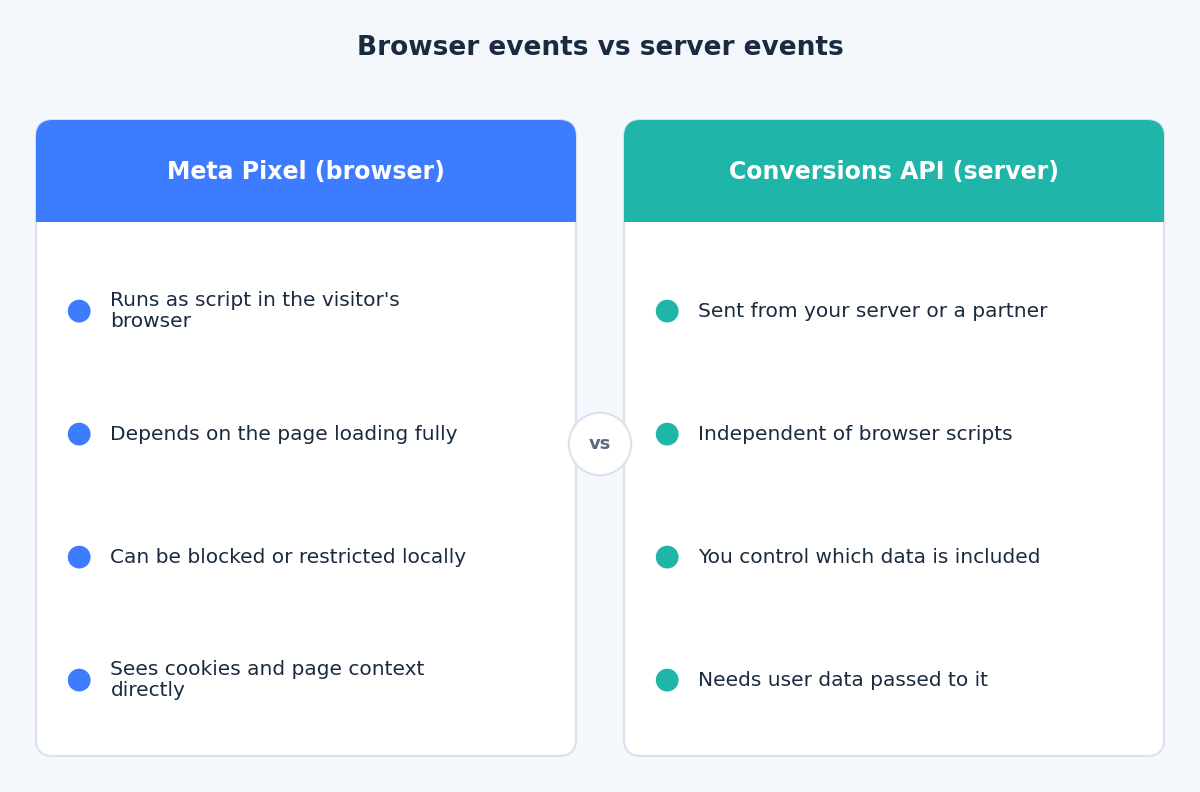
Most Meta accounts start with the Meta Pixel: a snippet of JavaScript that runs in the visitor’s browser and reports actions such as page views, leads and purchases. It is quick to install, and for a long time it was the only tracking most advertisers needed.
The weakness is in the phrase “runs in the visitor’s browser”. Everything the Pixel reports depends on that browser loading the script, allowing the request, and staying on the page long enough to send it. The Conversions API is Meta’s answer to that dependency. This post explains what it changes, what it does not change, and why Meta recommends using it together with the Pixel rather than instead of it.
Where a browser-only Pixel loses events
A browser event is a request made from the visitor’s device to Meta. Anything that interferes with that request means the event never arrives. The usual causes are:
- Ad blockers and privacy tools. Some extensions and browser settings block requests to known tracking domains.
- Browser restrictions. Browsers differ in how long they keep cookies and how they treat cross-site requests, which affects the identifiers the Pixel relies on.
- Consent choices. If a visitor declines marketing cookies and your consent setup correctly stops the Pixel, no browser event is sent.
- Page and network problems. A slow page, a script that fails to load, or a visitor who closes the tab right after paying can all leave a purchase unreported.
We are not putting a percentage on any of this. The size of the gap depends on your audience, your site and your consent banner, and we would not trust a generic figure. The point is that the Pixel can only report what the browser lets it report.
What the Conversions API does differently
According to Meta’s Conversions API overview, it creates a connection between an advertiser’s marketing data, from a server, website platform, mobile app or CRM, and Meta’s systems that are used for ad targeting, cost per result optimization and measurement. Server events are processed like events sent with the Pixel.
In practice, a server event is sent from infrastructure you or a partner control, not from the visitor’s device. That is why it does not depend on a browser script running. It also means the server can send events that never happen in a browser at all, such as a CRM status change.
The trade-off is that the server does not automatically know who the visitor is. Meta’s documentation says website events sent through the API require client_user_agent, action_source and event_source_url, and it recommends adding customer information parameters to help matching. Without them, a server event may arrive but be hard to connect to a person on Meta.
Why the recommendation is “redundant”, not “replace”
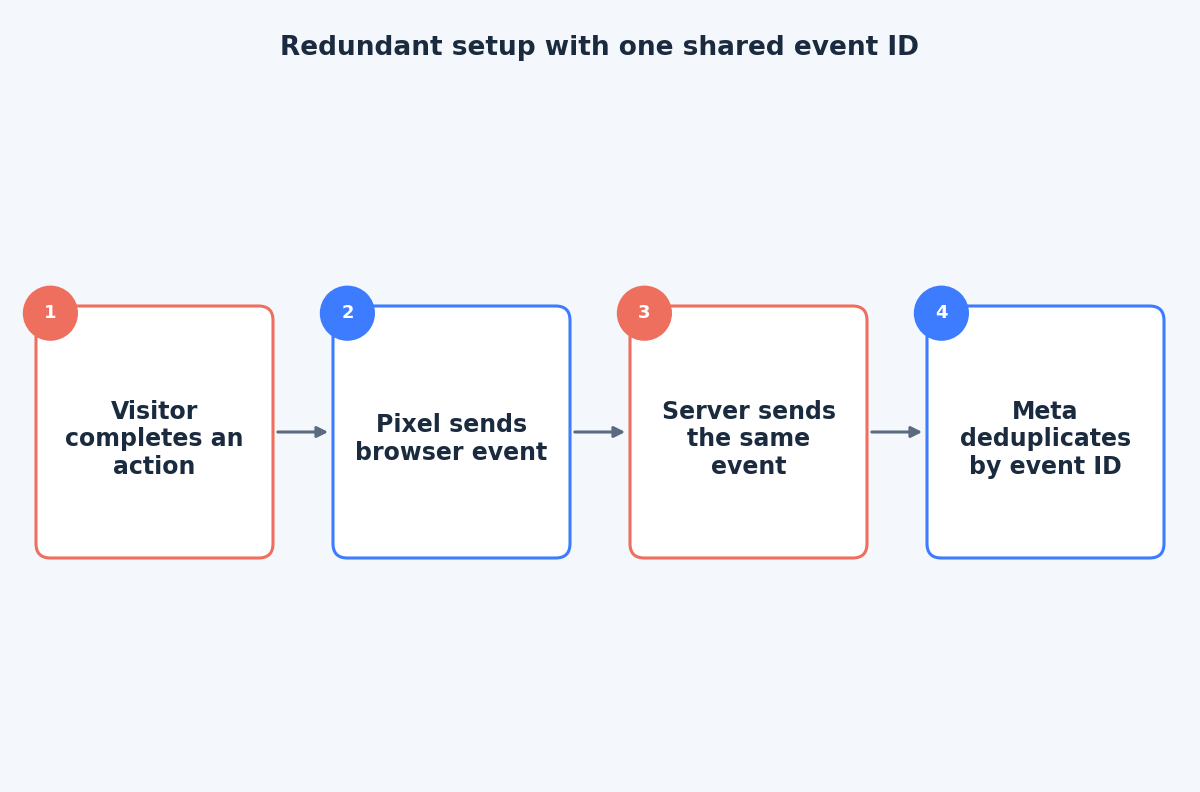
Meta’s Conversions API best practices say to use the Conversions API in addition to the Meta Pixel and to share the same events using both tools. Meta calls this a redundant setup.
The logic is simple. The Pixel sees browser context directly, such as cookies and the page. The server is not affected by browser blocking. If one path fails for a given visit, the other may still report the event. If both succeed, Meta needs a way to count the action once.
Deduplication: how one purchase stays one purchase
When the same purchase arrives from both the browser and the server, it must not be counted twice. Meta’s deduplication documentation describes the main method: the Pixel’s event and the API’s event_name must match, and the Pixel’s eventID must match the API’s event_id.
There is a fallback that uses fbp and external_id consistently on both sides, but the documentation notes it works only for events sent first from the browser and then through the server. It also says events are only deduplicated if they arrive within 48 hours of the first event with that event_id. The event_id route is the more dependable one, so plan for it from the start.
A sensible first setup
You do not need to rebuild everything at once. A practical order looks like this:
- Confirm the Pixel works. Check that your key events, such as Lead or Purchase, fire once per action and carry value and currency where relevant.
- Choose how server events will be sent. Options range from a platform or partner integration to a Conversions API Gateway to a custom or server-side tagging setup. Meta notes these methods vary in effort, cost and features.
- Use the same Pixel ID for both. Meta recommends the same Pixel ID for browser and server events.
- Add an event ID on both sides so deduplication has something reliable to match.
- Send events promptly. Meta’s best practices say you can share server events in real time or in batches close to real time, and the events documentation recommends sending as soon as they occur, ideally within an hour.
- Test before you trust it. Use the Test Events tool in Events Manager, and remove any test event code from the production payload afterwards.
What it does not fix
Server-side does not mean consent-free. If your visitors in the EU are asked for consent, the server events should respect their choice, and the consent state needs to reach whatever sends the events. The Conversions API is a delivery path, not a way around privacy rules.
It also does not guarantee more reported conversions or better results. A poorly matched or duplicated server feed can make reporting worse. The gain comes from a clean redundant setup, where each real action is reported once and carries enough customer information to be matched.
The takeaway
A browser-only Pixel reports what the browser allows. The Conversions API adds a second, server-based path, and Meta’s recommended pattern is to run both with a shared event ID. If you want help checking your current setup or planning a redundant one, get in touch through the contact page.
Related reading
- Event Match Quality and deduplication: making Pixel and Conversions API events agree.
- GTM server container vs direct Meta CAPI: when server-side tagging pays off.
- A Meta tracking data-quality audit: what to check in Events Manager.