Scaling looks simple: an ad set is profitable, so you give it more money. Sometimes that works. Often the cost per result climbs, delivery turns erratic, and by the end of the week the ad set that was your best performer is your worst.
Nothing mysterious is going on. Budget is one input among several, and the way you change it affects how stable delivery stays. This post covers the basics of the learning phase, how to choose step sizes, when duplicating makes sense, and what to check after each change.
What the learning phase is
When an ad set starts, or changes in a way that matters, Meta’s delivery system has to relearn who is likely to respond. During that period results are less stable. Meta’s Marketing API reference for learning stage info shows how it thinks about this. Each ad set has a learning status of learning, success or fail. It counts the conversions recorded since the last significant edit, and it stores the timestamp of that edit.
The way to read this: learning is not a penalty, and leaving it is not a prize. It is a period of higher uncertainty that starts again whenever you change something significant, and an ad set that never gets enough results to exit is flagged as such.
We are deliberately not quoting an event count here. Meta’s Help Center page on the learning phase defines the requirement, and advertisers have reported seeing different thresholds in their own accounts at different times. Check the current wording there and the status shown in your own Delivery column, not a number from a blog post.
What sends an ad set back into learning
Ads Manager can show a column for the last significant edit, which is a useful log of what you changed and when. In general, edits that change what the system has already learned count: targeting, the optimisation event, the bid strategy and creative changes, and sometimes large budget changes. Behaviour can differ between accounts and can change over time, so use the column as your reference rather than a fixed list.
Two habits prevent most self-inflicted resets:
- Change one thing at a time. If you alter the budget, the audience and two ads on the same day, you will not know which one caused the drop.
- Log every change. A simple note with the date, the ad set and the change is enough.
Raise the budget or duplicate the ad set?
Both work. They solve different problems.
- Raising the budget keeps the ad set’s history. It is the default option when the ad set is stable and you want more of the same. The risk is a jump that is too large.
- Duplicating creates a fresh ad set with its own learning and its own delivery. It is useful when you want to test a new audience, placement or structure, or when the original has reached a ceiling. The risk is that ad sets from the same account aimed at similar people can compete with each other and split the same results across two places.
A useful rule: raise budgets to scale what you already have, and duplicate to test something different. Duplicating a winner every time you want more spend usually fragments your data.
Choose step sizes you can undo
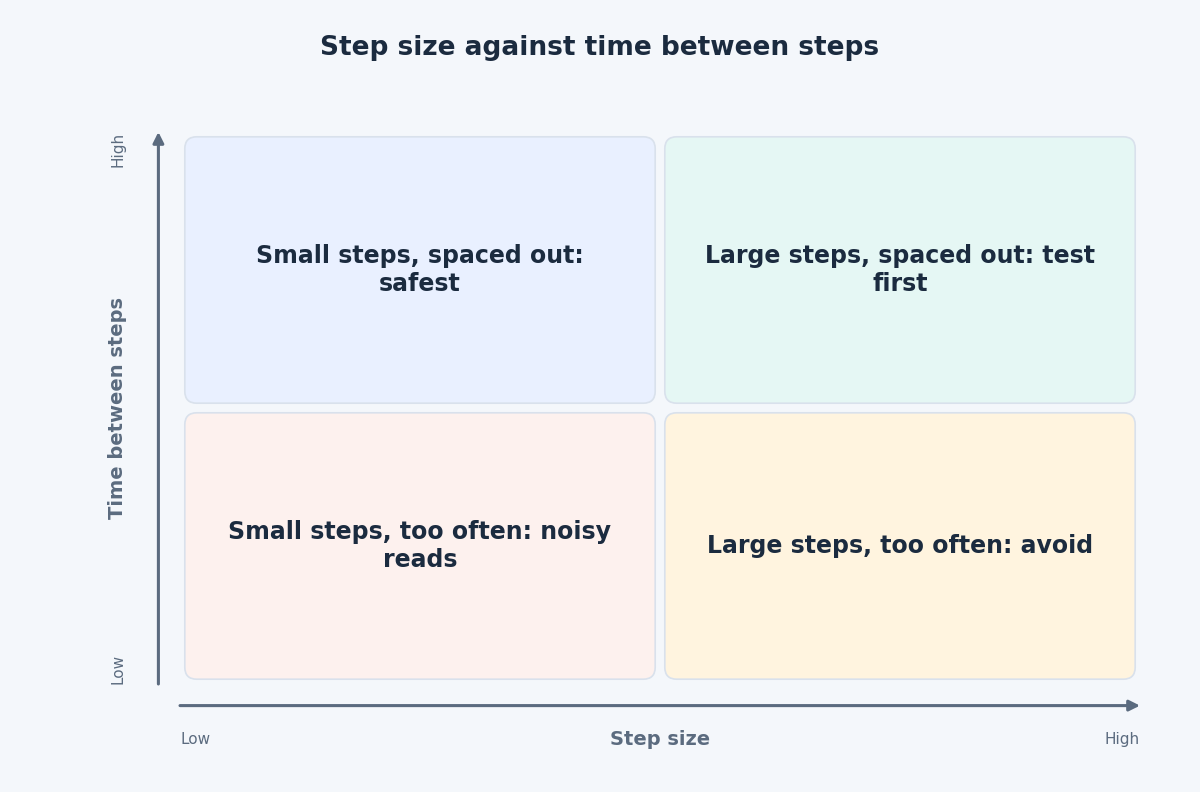
We cannot point to a Meta page that gives one step size that is safe for every account. In many accounts Ads Manager shows a message when you edit a budget, indicating how large an increase can be made without re-entering learning. If you see it, treat it as the ceiling for that edit.
Where you do not, use a conventional approach that many practitioners follow: small increases, spaced a few days apart. Around 10 to 20 percent per step is a common starting range. That is a convention, not a Meta rule, and you should adjust it to how your own account behaves. The principles matter more than the number:
- Start from a stable baseline. Confirm the ad set has out-of-learning status and steady results over at least a week.
- Decide the guardrail first. For example, the highest cost per result you will accept.
- Make one step and record the date.
- Leave everything else alone until the results have had time to settle.
- Compare against the baseline, not against yesterday.
- Continue, hold or reverse. If the guardrail is broken, return to the previous budget and wait.
What to watch after each change
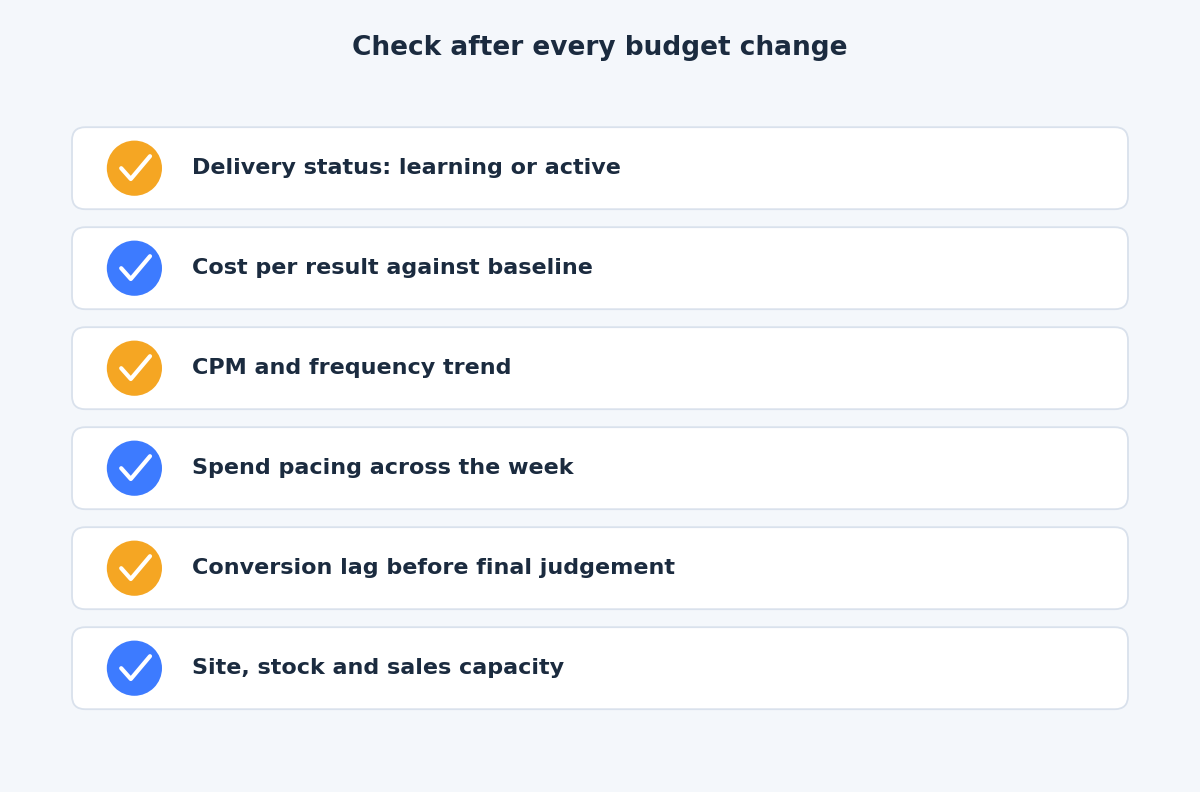
- Delivery status. Check whether the ad set is back in learning or shows limited delivery.
- Cost per result against the baseline. Use a rolling window of several days, because single days can swing.
- CPM and frequency. Rising CPM and frequency often mean the audience is being saturated or the creative is tiring.
- Spend pacing. A daily budget works as an average across the week, so spend on individual days can sit above or below it. Look at weekly totals.
- Conversion lag. Conversions are attributed after the click, so a budget change today shows its full effect days later. Do not judge the step too early.
- Everything behind the ad. More traffic means more strain on the site, on stock and on the sales team who answer the leads.
Know when budget is not the constraint
If cost per result rises every time you scale, the limit may not be budget. Scaling needs more fuel: new creative concepts, fresh angles, and enough conversion data. When frequency is climbing, adding money to the same ad only buys more repeat impressions. In that case add concepts first, then budget.
The takeaway
Scale in steps you can reverse, change one thing at a time, and read results over enough days to be fair. If you would like a second pair of eyes on your Meta account before a budget increase, get in touch through the contact page and we can plan the steps together.
Related reading
- Creative diversification on Meta: why distinct concepts beat variations.
- A creative testing framework for Meta Ads: how to test creative without picking false winners.
- Google Ads budget control: daily limits, pacing and shared budgets.